netlify deploy, build 오류
방치되다시피 한 넷리파이 기술 블로그에 post 작성 할일이 생겨 오랜만에
Markdown을 작성하고 commit and push를 했다.
하지만 오류가 났다…
(왜…why…나 진짜 오랜만에 마크다운 작성해서 기분좋게 커밋 하고 푸시했는데..왜..)
netlify deploy error
유투브에서 개발 강의 보다가 봤다.
개발자는 문제 해결 능력이 중요하다고,
이렇게 아래와 같은 문제를 직면했다.
...
4:26:40 PM: Installing NPM modules using NPM version 7.6.0
4:26:52 PM: npm ERR! code ERESOLVE
4:26:52 PM: npm ERR! ERESOLVE unable to resolve dependency tree
4:26:52 PM: npm ERR!
4:26:52 PM: npm ERR! Found: react@17.0.2
4:26:52 PM: Creating deploy upload records
4:26:52 PM: npm ERR! node_modules/react
4:26:52 PM: npm ERR!   react@"^17.0.1" from the root project
4:26:52 PM: npm ERR!   peer react@"^17.0.0 || ^18.0.0" from @mui/icons-material@5.10.9
4:26:52 PM: npm ERR!   node_modules/@mui/icons-material
4:26:52 PM: npm ERR!     @mui/icons-material@"^5.1.0" from the root project
4:26:52 PM: Failed during stage 'building site': Build script returned non-zero exit code: 1 (https://ntl.fyi/exit-code-1)
4:26:52 PM: npm ERR!   20 more (@mui/material, react-dom, gatsby, ...)
4:26:52 PM: npm ERR!
4:26:52 PM: npm ERR! Could not resolve dependency:
4:26:52 PM: npm ERR! peer react@"0.0.0-experimental-c8b778b7f-20220825" from react-server-dom-webpack@0.0.0-experimental-c8b778b7f-20220825
4:26:52 PM: npm ERR! node_modules/gatsby/node_modules/react-server-dom-webpack
4:26:52 PM: npm ERR!   react-server-dom-webpack@"0.0.0-experimental-c8b778b7f-20220825" from gatsby@4.24.6
4:26:52 PM: npm ERR!   node_modules/gatsby
4:26:52 PM: npm ERR!     gatsby@"^4.9.3" from the root project
4:26:52 PM: npm ERR!     24 more (gatsby-plugin-advanced-sitemap, ...)
4:26:52 PM: npm ERR!
4:26:52 PM: npm ERR! Fix the upstream dependency conflict, or retry
4:26:52 PM: npm ERR! this command with --force, or --legacy-peer-deps
4:26:52 PM: npm ERR! to accept an incorrect (and potentially broken) dependency resolution.
4:26:52 PM: npm ERR!
4:26:52 PM: npm ERR! See /opt/buildhome/.npm/eresolve-report.txt for a full report.
4:26:52 PM: npm ERR! A complete log of this run can be found in:
4:26:52 PM: npm ERR!     /opt/buildhome/.npm/_logs/2022-11-03T07_26_52_326Z-debug.log
4:26:52 PM: Error during NPM install
4:26:52 PM: Build was terminated: Build script returned non-zero exit code: 1
4:26:52 PM: Failing build: Failed to build site
4:26:52 PM: Finished processing build request in 30.782027089s
...
일단 gatsby version 과 react 버전이 안 맞다는 얘기 인것으로 추론.
로컬에서는 잘되는데 netlify 에 배포만 한되는 것이기 때문에 netlify 환경 설정을 위해 구글링을 열심히 해보았고,
npm run build, npm install, npm start 안될땐 무조건 아래와 같이 하고 있어서, 다시 시도했다.
- node_modules 폴더 지우기
- package-lock.json 파일 지우기
- npm cache clean —force 캐시 지우기
- npm install 다시 npm install
(다른 삽질로는 netlify.toml도 바꿔보고 peer에 나오는 버전으로 다 바꿔보았지만… 이렇게 바꿔도
또 바꾸라고 하고, 또 또 또 바꾸라고 해서 답이 나오지 않았다.ㅜㅜ)
로컬에서도 다시 npm install 을 했더니 비슷하게 netlify에서 찍힌 내용과 비슷하게 나왔고,
react와 gatsby 버전때문에 생긴 이슈로 파악한 뒤
—force 와 —legacy-peer-deps 옵션을 사용하면 정상적으로 설치되고, 실행됐다.
- npm install —force : 충돌하는 부분들을 root에 설치.
- npm install—legacy-peer-deps : 충돌하는 부분들을 무시하고 설치.
그래서 이부분을 위해 netlify 설정에서 Environment(환경이란 뜻이죵~)에 들어가서 아래와 같이 설정한다.
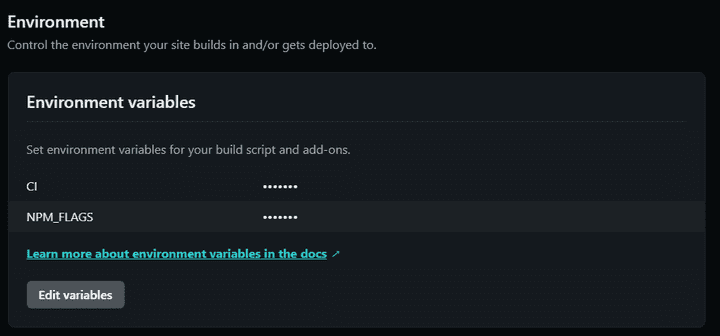
CI = false -> CI 라는 환경변수
NPM_FALGS = —legacy-peer-deps -> 충돌이 나도 무시 하갔다!!!
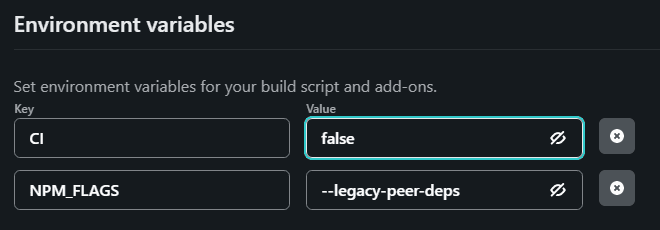
그리고 build setting 도
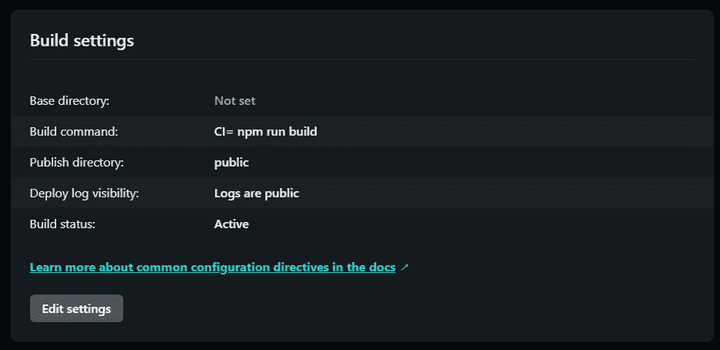
Build Command : CI= npm run build
로 변경해주고,
Publish directory : 도 로컬에서 npm run build 했을때 생성된 폴더명과 동일한지 잘 확인 후 (나는 public 으로 되어있는걸 확인 함) save!!!
그랬더니!!! 배포는 안됐지만 메세지는 변경되었다.
...
3:53:56 PM: info Total nodes: 121, SitePage nodes: 17 (use --verbose for breakdown)
3:53:56 PM: success Checking for changed pages - 0.000s
3:53:56 PM: success onPreExtractQueries - 0.000s
3:54:02 PM: success extract queries from components - 6.613s
3:54:02 PM: success write out redirect data - 0.003s
3:54:03 PM: success Build manifest and related icons - 0.614s
3:54:03 PM: success onPostBootstrap - 0.691s
3:54:03 PM: info bootstrap finished - 19.282s
3:54:03 PM: success write out requires - 0.004s
3:54:27 PM: failed Building production JavaScript and CSS bundles - 23.676s
3:54:27 PM: error Generating JavaScript bundles failed
3:54:27 PM: Can't resolve '@emotion/react' in '/opt/build/repo/node_modules/@mui/styled-engine/GlobalStyles'
3:54:27 PM: If you're trying to use a package make sure that '@emotion/react' is installed. If you're trying to use a local file make sure that the path is correct.
3:54:27 PM: error Generating JavaScript bundles failed
3:54:27 PM: Can't resolve '@emotion/react' in '/opt/build/repo/node_modules/@mui/styled-engine/StyledEngineProvider'
3:54:27 PM: If you're trying to use a package make sure that '@emotion/react' is installed. If you're trying to use a local file make sure that the path is correct.
3:54:27 PM: error Generating JavaScript bundles failed
3:54:27 PM: Can't resolve '@emotion/styled' in '/opt/build/repo/node_modules/@mui/styled-engine'
3:54:27 PM: If you're trying to use a package make sure that '@emotion/styled' is installed. If you're trying to use a local file make sure that the path is correct.
3:54:27 PM: error Generating JavaScript bundles failed
3:54:27 PM: Can't resolve '@emotion/react' in '/opt/build/repo/node_modules/@mui/styled-engine'
3:54:27 PM: If you're trying to use a package make sure that '@emotion/react' is installed. If you're trying to use a local file make sure that the path is correct.
3:54:27 PM: error Generating JavaScript bundles failed
3:54:27 PM: Can't resolve '@emotion/react' in '/opt/build/repo/node_modules/gatsby-plugin-material-ui'
3:54:27 PM: If you're trying to use a package make sure that '@emotion/react' is installed. If you're trying to use a local file make sure that the path is correct.
3:54:27 PM: not finished Running gatsby-plugin-sharp.IMAGE_PROCESSING jobs - 34.372s
3:54:27 PM:
...
또 갑자기 emotion/react 가 문제인 것으로 보여,
그냥 아래와 같이 설치해주었다.
npm install @emotion/react
npm install @emotion/styled
설치 후 변경된 package.json 파일을 commit 후 push 완료 했더니!!!
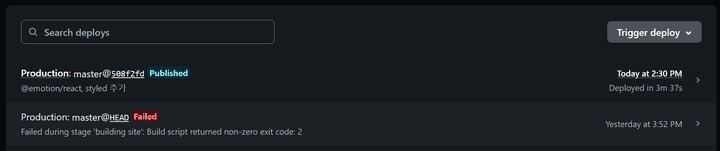
겨우 배포가 완료되었다.
다음번에는 더 깊이 netlify의 배포 프로세스에 대한 부분을 알아봐야 겠다.~
더더 발전하자!
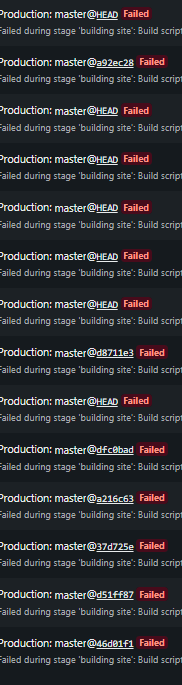
배포 안되서 삽질한 흔적…
그럼 20,000;